Why should ALL teachers participate in the hour of code with their students? You may be thinking, "I don't teach computer science, and I don't want to give up an hour of my valuable class time". While you may not be teaching a computer science course, coding teaches students problem solving skills, critical thinking, collaboration, and perseverance. These are all skills that any teacher, in any subject area, would love for their students to have and practice. And, coding is used to help people in all job fields, so it is a great way to share with your students applications in the work force to your subject area.
Getting started in coding is actually easy, and as a teacher, you do not need to know how to code yourself! But honestly, it's a lot of fun. Here's a Star Wars game I created after completing a Hour of Code tutorial. (Stay away from the Storm Troopers, and try to get the Tauntuans.)
How do you participate in the Hour of Code?
The Hour of Code takes place during Computer Science Education Week, December 7-13. All you need is an hour (or 50 minutes if that is all you have). You don't even need devices, but it is a little more fun if you do.
Go to the Code.org tutorial page and choose a tutorial for your class (or let your students choose their own). I recommend the Star Wars one. It has a Java version which is geared for older students, and students can create their own game at the end. Also, students can complete these tutorials using a computer, chromebook, or even on their phones using an internet browser.
It helps if you go through the tutorial yourself ahead of time. But honestly, you don't need to. The students will be fine doing it without you having to be an expert.
Have the students create an account, and work on the tutorial. You will be amazed watching your students create, think critically, and fail and try again.
If you don't have devices, go to code.org/learn and scroll down to "unplugged computer science".
One of my favorite vocabulary lessons, that I learned early in my teaching career, is called "Ten Important Words". It is a great way for students to find meaning of words based on the context of the text, allows students to judge the importance of the words, collaborate and then summarize the text. It was a little hard to manage some of the whole class collaboration. Adding a little technology simplified the entire process, and allowed more class time to be spent on deeper conversations around the meaning of the words and the text. The Original Assignment: When assigning a short reading, students would first read the text, and then go back and highlight what they believed were the ten most important words. I generally assigned this for homework, and the text size was never more than a few pages. It could be an article or a small section of a chapter.
Then, in groups of four, students would have to come up with one list that they all agree upon. So students would go through and have to convince the their group that their words are more important than others. It was so awesome to see students "fight" and "argue" for their words. In their "arguments", they were using evidence from the text and comparing and contrasting the value of the word in making meaning of the text. (They don't really fighting, but they do get really into discussing and advocating for their own words.)
Then, after the group decided on their one list, we would combine them and decide as a class what the test most important words were. Next, students would define the class list of words and then write a one paragraph summary of the text, using those ten words in context.
As you can imagine, it was challenging to collect the words from each of the class groups and agree on the class list of the ten most important words. So I decided to take advantage of some technology tools and using the student's cell phones. Integration of Technology I set up a simple Google Form that just had one question for the groups to fill out, list your 10 important words. One student in the group would pull out their cell phone and type in their list.
I would then go to the Google Sheet that contained the form data, and highlight all of the words typed in by my groups.
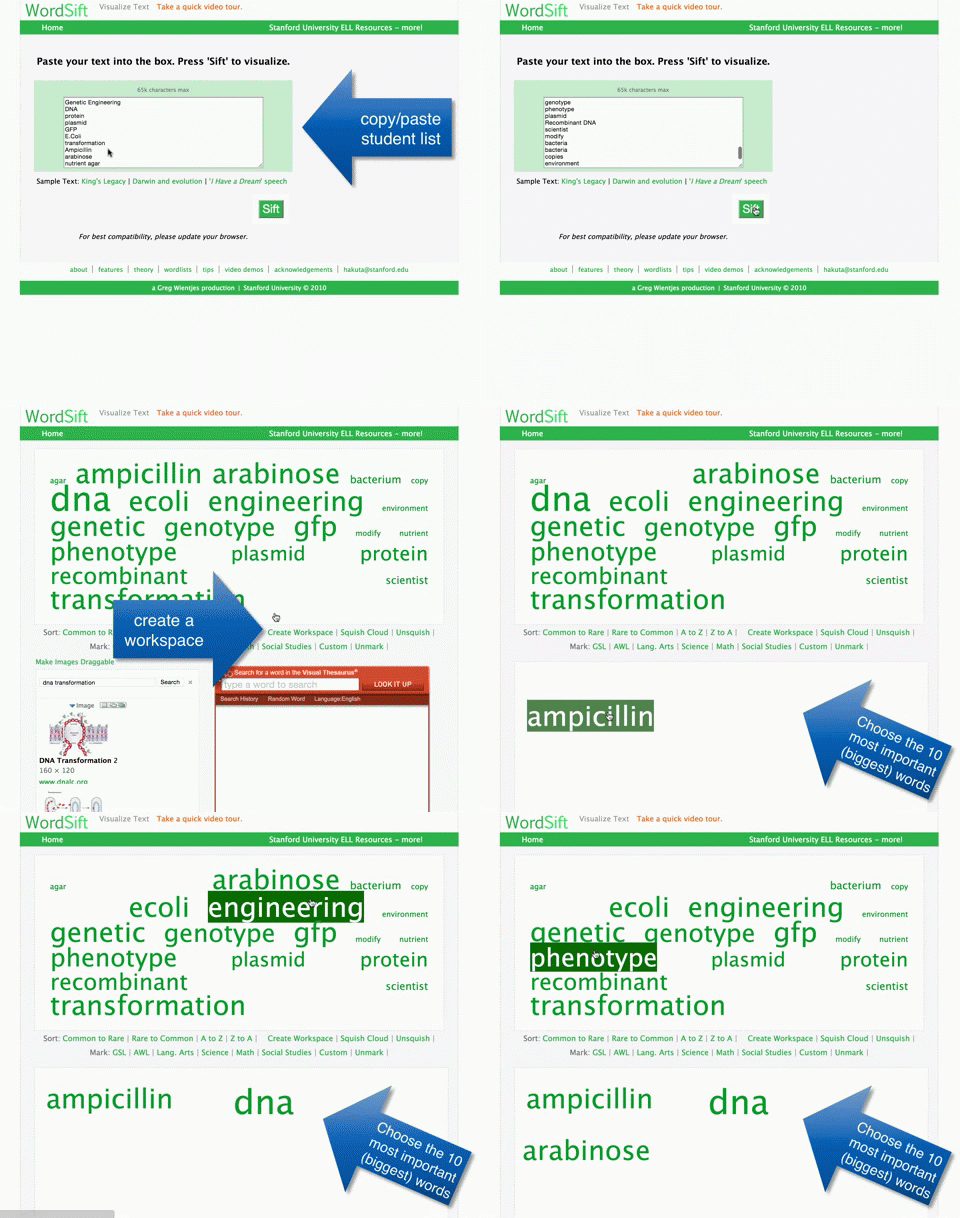
Next, I would go to wordsift.com and paste in the list of words generated by my student groups. After pressing "sift", I get a word cloud, where the most used words are bigger than the others. I can then click "create workspace" and drag the 10 most important words to one spot. This process takes only a few minutes to do and saves a lot of class time. Now, I can have a discussion with the class and ask why some of their words didn't make it to the class list, and discuss the definitions and the reading, before the students write their summaries.
Other Uses for Word Sift
You can copy and paste in entire texts, poems, stories, speeches, etc. When you sift, you not only get a word sift showing the most used words and a workspace, but can sort alphabetically or by common to rare words. When you click on a word, you will find, images, and a visual thesaurus. This can really help students understand and make meaning of the text or key ideas.
Students can even enter in their own writing and see if they use some words too much, or students can enter copy and paste their textbook in to see the big concepts or ideas.
“Everybody in this country should learn how to program a computer…. because it teaches you how to think.” - Steve Jobs
Anyone can code. I’ve even seen students as young as 5 years old coding. Coding teaches valuable critical thinking skills and is used in every field, not just computer sciences, math, or science.
The Hour of Code is coming up, and it is a great chance for you to introduce your students to code in any subject area. You can help your students build critical thinking skills and take away their fears about coding.
Statistics from Computer Science Education Week
By 2020, 1 million computing jobs will be unfilled (adding up to $500 billion in salaries).
More than 50 percent of all projected math and science occupations are in computing occupations.
Computing occupations are among the highest-paying jobs for new graduates. Yet fewer than 3% of college students graduate with a degree in computer science.
Fewer than 20 percent of AP Computer Science students are women. Fewer than 10% are Black/African American and Hispanic/Latino.
Guest Bloggers
Brian Ellis, a physics and computer science teacher from Carlmont, and Karyn Voldstad, a math and computer science teacher, also from Carlmont participated in the Hour of Code last year with their math and science classes. They both helped write this blog post to introduce you to the Hour of Code and encourage you to try it out with your students.
What is the Hour of Code?
It’s a national event to excite students about Computer Science. Students of all experience levels can choose from a variety of self-guided tutorials, which last less than an hour. You don’t need to know anything about coding to do it with your class.
When is it?
The Hour of Code is Dec. 8-14, 2014. You can pick one day that week and do it with one of your classes or all of your classes. It doesn’t take the whole week, just one class period.
Why would any teacher (not just computer science teachers) participate in Hour of Code?It’s a great opportunity for all your students to get a taste of coding. Learning to code helps nurture problem-solving skills, logic, and creativity. It also opens the way to lucrative careers. These activities are geared for success and are very game-like. Erin Lucett, a current Intro to CS student at Carlmont, says “I would definitely encourage teachers to have their students participate in the hour of code this year because it gives them a glimpse of what computer science is like and they may be able to see that coding is actually fun. Students would greatly benefit from the hour of code because it requires them to use problem solving skills to create a code that will do what they want.”
What classes did you have participate last year?
Math, physics and other classes participated at Carlmont last year. Many of those students decided to take Computer Science classes the following year.
What did students think about participating in the Hour of Code last year?
They loved it! Kids who might normally lose confidence in technical subjects were truly engaged. Eden Ricci, who participated in 2013 with her Carlmont physics class, recalls “I did enjoy the Hour of Code last year. It was my first introduction to computer programming and got me interested in taking the computer science class and learning more. It was not as confusing or complicated as I had expected it to be, more fun too.”
What does a teacher need to do to participate?
It takes very little to participate. Ideally you schedule your class in a computer lab or use a technology cart with Chromebooks or iPads. All you need is a browser. There’s even a version that can be done without computers and one that can be done on phones. It is all prepared for you. Just check out the link at code.org and choose a tutorial. The default code.org tutorial called “Write your Own Computer Program” is excellent, but so are many others. You can do it any day, with all your classes or just some of them.
Here are some tutorials on coding with great information on how to do this with your class. http://code.org/learn